Tutorials

Keeping the ServiceNow CMDB Up-to-Date with CloudQuery

Data integration can become a pain real quick given large enterprises. Your infrastructure spans AWS, Azure, GCP, Kubernetes, GitHub, Slack, and dozens of other systems — each with its own API, data format, and authentication method.

Traditional approaches mean building custom integrations for every platform, creating a maintenance nightmare that consumes massive engineering resources.

CloudQuery solves this with a unified data extraction platform that connects to 100+ sources and sends data to any destination. Instead of dozens of fragile custom integrations, you get one configuration that extracts, normalizes, and syncs data across your entire tech stack.

Let's see how we can transform data integration from a complex engineering challenge into a simple configuration problem, moving some example AWS IAM data to a ServiceNow CMDB.

Example: AWS Data Pipeline

Let's build a complete AWS infrastructure pipeline that extracts identity data, then prepares it as XLSX spreadsheet files and allows easy uploading to ServiceNow.

Setting Up the sync pipeline

Here's how to extract comprehensive AWS data and export it to Excel spreadsheets for ServiceNow import:

1. Install CloudQuery

If you haven't already, download and install CloudQuery and Sign In or generate an API Key. The steps should be thoroughly documented in the Quickstart guide.

2. Configure AWS Authentication

The AWS integration supports multiple authentication methods, as described in the plugin configuration section.

For the purpose of this example, we will use a pre-configured AWS Profile named cloudquery.

3. Create Configuration file

Create aws-to-file.yaml:

kind: source
spec:
name: aws
path: cloudquery/aws
registry: cloudquery
version: 'v32.38.0'
tables:
- aws_iam_users
- aws_iam_roles
- aws_iam_accounts
- aws_iam_policies
destinations:
- file
spec:
accounts:
- local_profile: cloudquery
---
kind: destination
spec:
name: file
path: cloudquery/file
registry: cloudquery
version: 'DRAFT_VERSION'
spec:
path: './servicenow-imports/{{TABLE}}.{{FORMAT}}'
format: 'xlsx'
no_rotate: true
batch_size: 0
batch_size_bytes: 0

4. Run the Sync

cloudquery sync aws-to-file.yaml

CloudQuery extracts the AWS IAM table data as configured and creates Excel spreadsheets ready for ServiceNow import:

  • servicenow-imports/aws_iam_accounts.xlsx
  • servicenow-imports/aws_iam_roles.xlsx
  • servicenow-imports/aws_iam_users.xlsx
  • servicenow-imports/aws_iam_policies.xlsx

Importing to ServiceNow

Once CloudQuery generates the Excel files, import them into ServiceNow:

  1. Navigate to ServiceNow Import Sets: Go to System Definition > Import Sets
  2. Upload Excel Files: Select each Excel file and configure field mappings
  3. Transform Data: Use ServiceNow's Transform Maps to map CloudQuery fields to your CMDB schema
  4. Run Import: Execute the import to populate your CMDB with AWS data

Explore your data and views
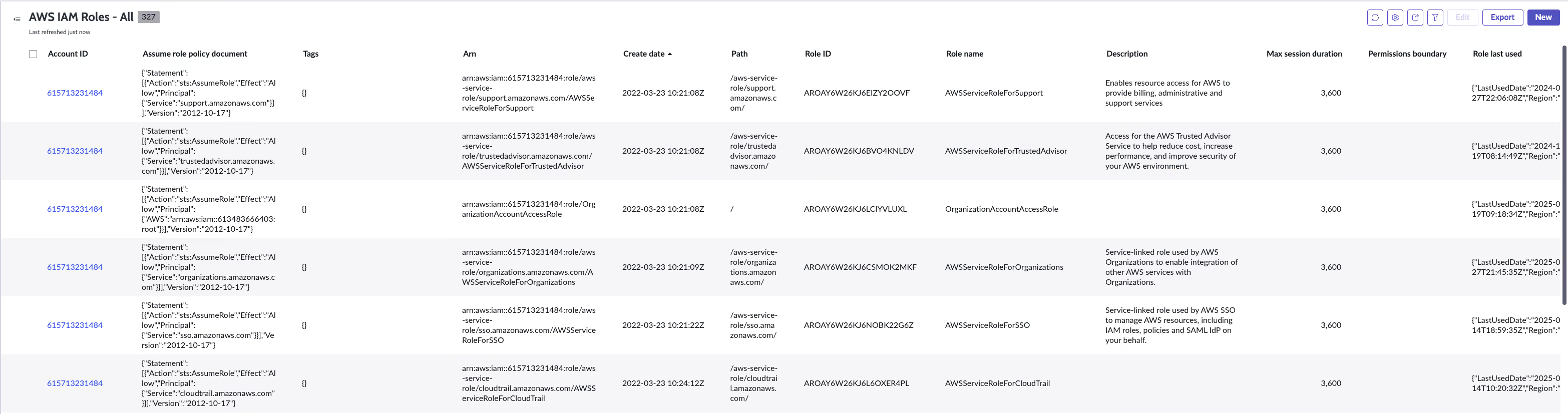
Screenshot of an example ServiceNow workspace with the imported and mapped AWS IAM data.

Conclusion

With CloudQuery, you can easily extract data from AWS and other sources, transform it into a format suitable for ServiceNow, and automate most of the process. This approach saves time, reduces complexity, and ensures your CMDB is up-to-date with the latest infrastructure data.

The example above is based on a draft version of the File destination integration, which is not yet available in the CloudQuery Hub. If you want to try it out, please contact us or let us know by opening a thread on our Community, and we can guide you through the process.

Ready to get started? Download CloudQuery and connect to your first data source in minutes.

Try CloudQuery yourself

Self-hosted, open source, and free to start. Or schedule a demo to see the managed version.

Related posts

Tutorials

How to Automatically Update CloudQuery Integrations with Renovate

Configure Renovate to automatically update CloudQuery integration versions in your YAML files using the CloudQuery Hub API as a custom datasource.

Matthew M

Matthew M

May 20, 2026

AWS

Security

Tutorials

Finding AWS Unrestricted Outbound Access in 2026: EC2, Lambda, and Beyond

Find EC2, Lambda, and ECS Fargate resources with unrestricted outbound access in AWS using SQL. Why egress controls still break attack chains in 2026.

Joe Karlsson

Joe Karlsson

May 5, 2026

AWS

Security

Tutorials

AWS IAM Identity Center with Google Workspace as an IdP: 2026 Step-by-Step Guide

Set up AWS IAM Identity Center with Google Workspace: SAML authentication, SCIM user provisioning, and group sync with CLI or ssosync. Updated for 2026.

Joe Karlsson

Joe Karlsson

May 5, 2026

GCP

Security

Tutorials

Creating Cross-Project Service Accounts in GCP (Console + gcloud CLI)

Create a GCP service account that reads across all your projects with one credential. Covers gcloud CLI, org-level vs.

Joe Karlsson

Joe Karlsson

May 5, 2026

AWS

Cloud Infrastructure

Security

Tutorials

Integrate AbuseIPDB Threat Intelligence with CloudQuery

Enrich your cloud asset inventory with AbuseIPDB threat intelligence to identify public cloud IPs with known abuse reports.

Joe Karlsson

Joe Karlsson

April 20, 2026

AWS

Cloud Infrastructure

Tutorials

How to Query ipinfo.io Data with CloudQuery

Learn how to enrich your cloud asset inventory with ipinfo.io IP geolocation and threat intelligence data using CloudQuery.

Joe Karlsson

Joe Karlsson

April 20, 2026

AWS

Security

Tutorials

AWS IAM Identity Center (Formerly AWS SSO): The Complete 2026 Guide

AWS SSO is now AWS IAM Identity Center. Set it up, configure permission sets, use the AWS CLI, and audit access across accounts with SQL.

Joe Karlsson

Joe Karlsson

April 6, 2026

AWS

Tutorials

AWS Pinpoint Is Being Deprecated: How to Assess Your Migration Scope

AWS Pinpoint reaches end of support October 2026. Query your Pinpoint usage across all accounts to find what needs migrating before the deadline.

Joe Karlsson

Joe Karlsson

March 24, 2026

Tutorials

Moving Data from PostgreSQL to MotherDuck

How to sync PostgreSQL data to MotherDuck using CloudQuery, with both one-off batch and continuous CDC streaming options for serverless analytics.

Herman Schaaf

Herman Schaaf

March 13, 2026

Own your pipeline.
Own your data.