An infrastructure data lake is a centralized repository to maintain and manage all configuration metadata from your cloud infrastructure, such as users, computers, networks, storage, and related cloud resources. The infrastructure data lake is also a fundamental piece for a consistent, scalable, and customizable implementation of other key solutions such as asset inventory, CSPM, CIEM, FinOps, and anything else requiring configuration data access.
This blog will review how an infrastructure data lake looks and how to build one.
Architecture
A good starting point is to look at our post titled What is the Modern Data Stack, given that an infrastructure data lake is basically a use-case-specific implementation on top of the modern data stack.
By taking the modern data stack approach to implementing your infrastructure data lake, you can reuse already existing tools in your enterprise, such as storage, data lakes, and visualization tools, avoiding yet-another-tool fatigue.
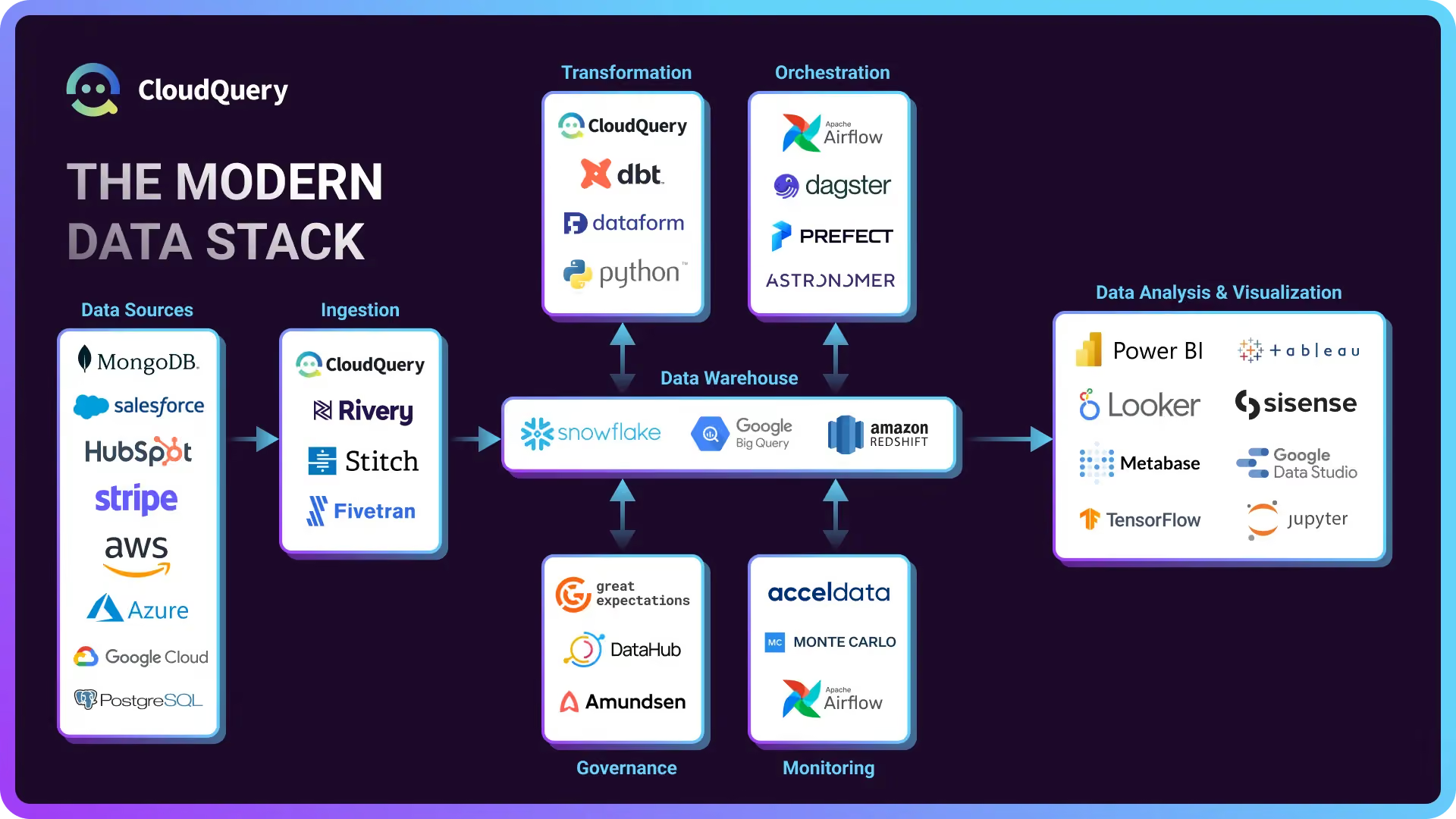
Data sources
For cloud infrastructure, you mostly want to work with cloud APIs such as AWS, Azure, GCP, Cloudflare, and any other relevant APIs that are part of your infrastructure and you want to get visibility into. You can check out all the supported CloudQuery source integrations, and for each integration, you can decide on which resource/tables you want to sync to decrease the amount of compute and storage needed.
Ingestion (Extract-Load)
For ingestion, you need to use an ELT (Extract-Load-Transform) tool that supports the sources and destinations that you need. CloudQuery (as you are on the CloudQuery website) is a high-performance data movement platform that supports 70+ sources and 15 destinations with great coverage for cloud infrastructure APIs.
Storage
For storage, you can use anything from a simple PostgreSQL database to a data warehouse such as BigQuery or a data lake such as S3 and Athena. This will mostly depend on what you already have in the organization, the amount of data, and what teams are familiar with.
Transformation
Basic normalization happens on the CloudQuery side, where APIs are transformed into structured data through tables at the destination. This allows users to query every resource and create interesting joins to gain new insights between resources and clouds. However, as use-cases expand, creating new views that materialize complex queries and connections is advisable, making it easy for everyone to query and visualize them. For example, asset inventory views that normalize all resources to a single view, whether inside one cloud or across, and compliance views that summarize checks across your cloud environments.
Visualization
Running raw SQL queries is great, but sometimes, you might want to put a fancy graph or visualization that helps you monitor, take a quick look, know what's going on, and share with other non-technical users. To do this, you can plug in your favorite BI tools such as Grafana, Preset, PowerBI, or anything else you already use.
Ingestion, storage, transformation, and visualization are the key steps in the pipeline that can take you pretty far. However, moving forward, you can further enhance your production process with other tools in the modern data-stack ecosystem, such as monitoring and governance tools.
Monitoring
Ingestion, storage, transformation, and visualization are the key steps in the pipeline that can take you pretty far. However, as you move forward, you can produce even more with other tools in the modern data stack ecosystem, such as monitoring and governance tools.
Use Cases
The infrastructure data lake is a key component for building several popular use cases in a customizable and scalable way.
Cloud Asset Inventory
Once all the configuration data is in your data lake, it’s easy to create any view or correlation with standard data tools. For example, by normalizing resources in different clouds, you can create a cross-cloud asset inventory view and visualize it. Take a look at how to build an open-source cloud asset inventory with CloudQuery and Grafana, which includes pre-built views and dashboards.
CSPM
Cloud Security Posture Management (CSPM) is a popular solution for security professionals to audit and monitor their cloud configurations for security best practices and their internal policies. Those solutions usually come as pre-packaged dashboards with pre-built rules and custom query languages. The upside of those solutions is that it is easy to get started. Still, when some customization is needed, it’s hard to access the raw data with standard data tools and integrate it with any other standard visualization tools.
FinOps
Optimizing cost, placing guardrails, and tagging best practices is a full-time job, especially in big cloud environments. But to understand what you need to optimize, you need access to both your cost data (such as AWS CUR data) and your infrastructure in queryable manager to drive insights.
For example, check out:
- “Correlating Costs to resources for Azure cost optimization”
- “How to Enrich AWS Cost and Usage Data with Cloud infrastructure Data in Athena”
CIEM
Cloud Infrastructure Entitlement Management (CIEM) manages identities and privileges in cloud environments. In layman's terms, it is the process of understanding who has access to what. This can be done by querying tables such as aws*iam*\* and correlating with other resources or even normalizing users across cloud providers such as gcp*iam*\*. Or even ad-hoc analysis such as “Finding Cross-Account AWS Event Bridge Usage”
Get Started with CloudQuery
Want to see CloudQuery in action? Schedule a demo with our team or check out the platform documentation to learn more.
Got feedback or suggestions? Join the CloudQuery community to connect with other users and experts, or message our team directly here if you have any questions.
Written by

Try CloudQuery yourself
Self-hosted, open source, and free to start. Or schedule a demo to see the managed version.