Introduction
At CloudQuery, we provide simple and efficient ELT for a broad range of customers. Recently, I was tasked with investigating an OutOfMemory issue in one of our popular sync configurations: syncing from an AWS source to an S3 destination.

Our syncs involve significant parallelism, and since we hadn’t encountered major memory issues before, we feared it was time to refine our concurrency model. But first, we needed a memory profile to understand the problem better.
How to run a memory profile?
We’re a Go shop, so our sync tool and most of our software is written in Go.
While I hadn’t done much profiling in Go before, I knew they use a variant of Google’s pprof from reading Russ Cox's blog post.
The full instructions are here, but the simplest way to run a memory profile using pprof is to add this import to main.go:
Ensure you have a server running (don’t do this if you already have one):
Then, you can take a snapshot of your memory usage by calling this endpoint:
This returns a pprof file you can chart. For a quick chart:
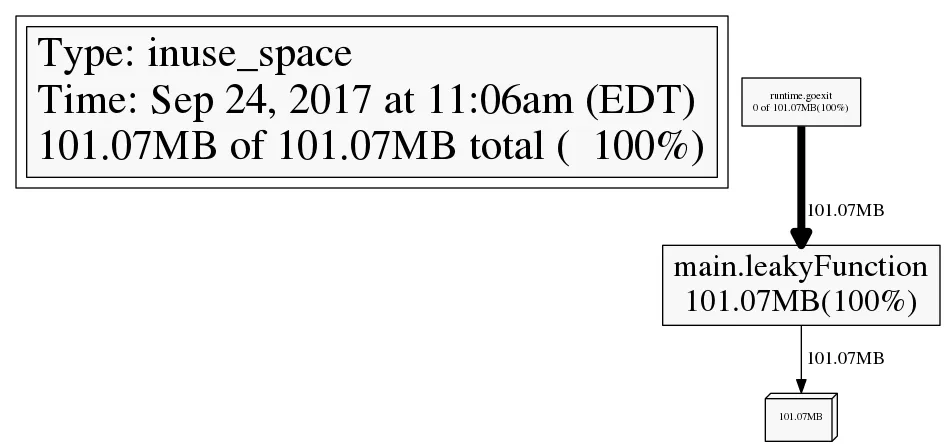
However, this chart is only useful if you know the precise moment to take it, as it’s a snapshot in time:
pprof ideal scenario
(Image from Julia Evans's blog post).
To chart memory over time, I turned to GC debug logs.
GC Debug Logs
Garbage collection information is crucial for us because streaming data from sources to destinations is bound to cause memory churn. You can add a debug flag to your Go binary's environment:
This outputs a line to stderr every time your binary runs a GC:
This provides:
- When GC ran, in seconds, since the binary started.
- CPU % spent in GC.
- Heap size before GC, heap size after GC, and live heap after GC.
The full docs for GODEBUG are here. Dave Cheney has an article on charting GC output using his tool gcvis. I created a similar tool for more customization:

- Pipe the
stderr output to a file. - Write a regex-based parse script to extract metrics to a CSV file.
- Plot it with
matplotlib.
Profiling CloudQuery syncs with gctrace
This was the initial chart I saw:
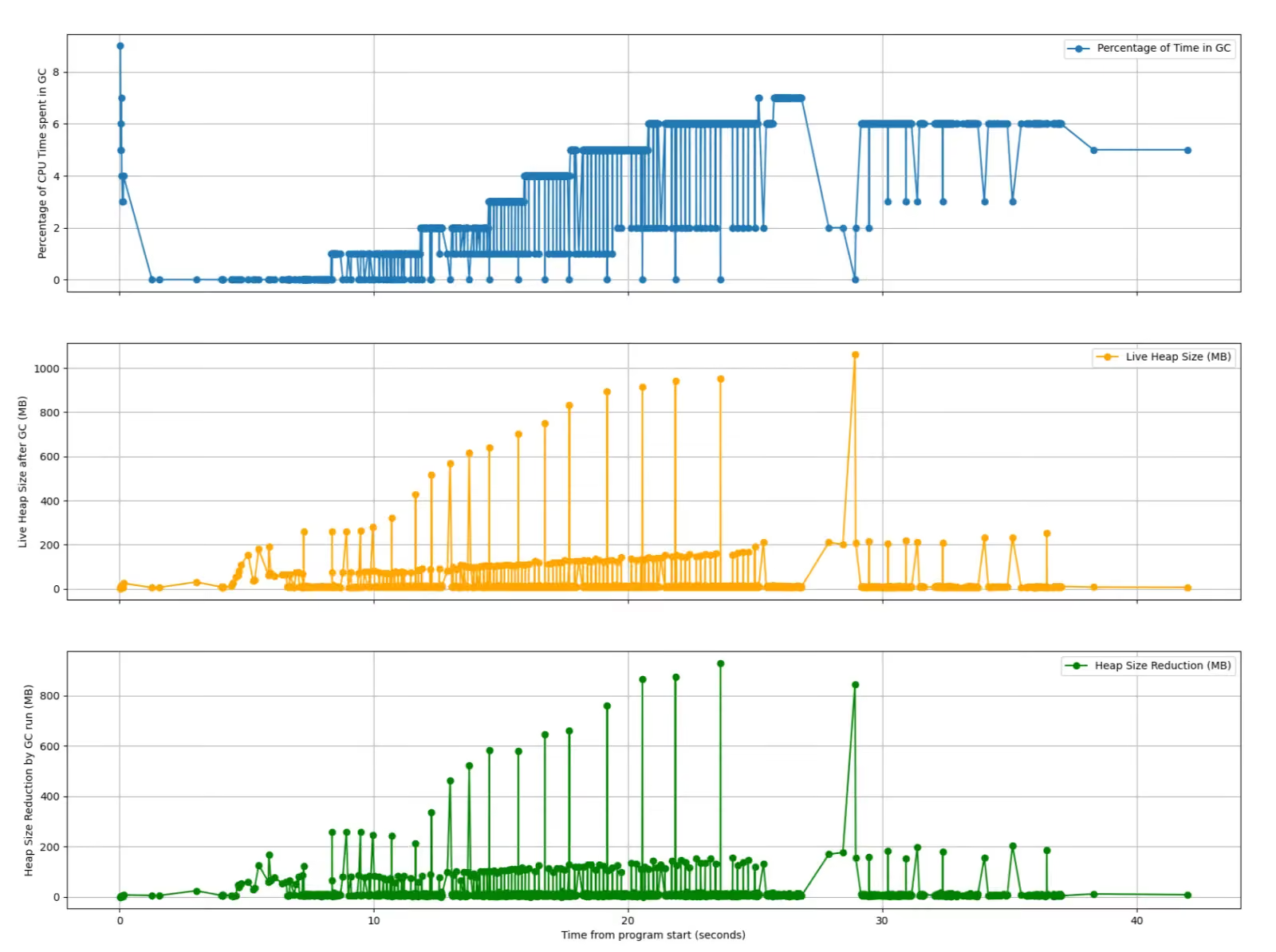
These weird spikes initially made me think we had a rogue allocation bug. Closer inspection revealed three distinct processes reporting GC information:


After updating the profiling setup, I found that only the S3 process was consuming a lot of memory:

Key observations:
- An initial spike of 2.5GB, leading to an OOM at peak, with a long tail.
- The total heap is twice as high as the live heap, meaning 50% of the total heap is garbage.
GOMEMLIMIT to the rescue?
Since 50% of memory was garbage, a straightforward solution was to trigger GC more often using GOMEMLIMIT. The GOMEMLIMIT variable sets a soft memory limit for the runtime, running GC more often when this threshold is crossed (read more here).
While this was a valiant attempt, it had drawbacks:
- Setting an absolute
GOMEMLIMITvalue for each customer setup is challenging. - Legitimate high memory use will still cause OOM.
- Frequent GC increases CPU usage, slowing down sync time.

Key points:
- Total heap usage decreased by over 50%.
- GC ran more frequently, consuming more CPU.
- Sync time increased significantly.
This was a no-go. The best way forward was to look at the code for improvements.
Revisiting pprof
A pprof heap snapshot at peak memory usage revealed a large amount of memory used by the S3 SDK's memory pooling mechanism:

This raised questions about:
- A bug in the SDK.
- Our misuse or misconfiguration of the SDK
- Legitimate but inefficient use of the SDK.
Three engineers look at three processes 👀
Our Framework team, consisting of Erez, Aleksandr, and myself, examined the code of the three components of our sync for bugs or optimizations.

Source back pressure
I found that we were not limiting the number of tables being synced concurrently. By setting a default concurrency limit of 125 tables, peak memory usage and the tail disappeared without increasing the total sync time.

Key points:
- 42% reduction in memory usage.
- Total sync time remained the same.
We didn't merge the PR, as we didn't need it.
Apache Arrow's RecordBatch
The three processes stream Apache Arrow records via gRPC connections.
Aleksandr noted we were sending one record at a time instead of using RecordBatches to stream multiple records at once. This change significantly improved memory usage.
Aleksandr describes the implementation in his blog post.

S3 SDK's memory over-allocation
Erez found that the S3 SDK allocated 5MB per uploaded chunk if the supplied io.Reader didn’t support seeking, only freeing memory when the upload succeeded. He fixed this by providing an io.Reader that supported seeking.

Key points:
- 84% memory usage reduction!
- Total sync time remained the same.
We merged the fix and reported it to AWS for consideration in a rewrite.
Conclusion
After a week’s work, we managed to:
- Fix our customers' memory issues.
- Better understand how our concurrency model impacts memory consumption.
- Develop a streamlined mechanism for profiling our popular source/destination matrix
- Have a lot of fun working on it!
Resource utilization issues will resurface as we deal with new sources, destinations, scaling challenges, and new features, but we’re better prepared now.
ELT at scale is complex, so if you’re rolling out your solution and facing difficulties, give CloudQuery a try.
Want to see CloudQuery in action? Schedule a demo with our team or check out the platform documentation to learn more.
Want help getting started? Join the CloudQuery community to connect with other users and experts, or message our team directly here if you have any questions.
Written by

Try CloudQuery yourself
Self-hosted, open source, and free to start. Or schedule a demo to see the managed version.