In this guide, we will walk you through how to set up CloudQuery to build your cloud asset inventory in PostgreSQL and connect it to Metabase for visualization, monitoring and reporting.
General Architecture
- ETL (Extract-Transform-Load) ingestion layer: CloudQuery
- Datastore: PostgreSQL
- Data Visualization and Exploration Platform: Metabase
What you will get
- Raw SQL access to all your cloud asset inventory to create views or explore any questions or connection between resources.
- Multi-Cloud Asset Inventory: Ingest configuration from all your clouds to a single data store with a unified structure.
- Avoid yet-another-dashboard fatigue: Use your existing Metabase setup to build a cloud asset inventory.
Walkthrough
Step 1: Install or Deploy CloudQuery
If it’s your first time using CloudQuery we suggest you first run it locally to get familiar with the tool, take a look at our quickstart guide and AWS source integration.
If you are already familiar with CloudQuery, take a look at how to deploy it to AWS on Amazon Aurora and EKS here.
Step 2: Install or sign up to Metabase
Metabase is open source data visualization and exploration platform (or per Metabase: “an open source way for everyone in your company to ask questions and learn from data”). There are a number of ways to deploy it:
- Self-hosted (jar, docker, source, AWS, …): https://www.metabase.com/docs/latest/operations-guide/installing-metabase.html
- SaaS/Cloud: https://www.metabase.com/start/
Step 3: Connecting Metabase to PostgreSQL
By default RDS Aurora instances are not accessible from the public internet. In order to enable access by Preset you are going to have to update your security groups to include the IP ranges that Preset publishes (or alternatively look at the publicly_accessible variable in our terraform modules - aws , GCP). If you deploy it in your own VPC you might be able to connect it in your private network.
Now you can connect Metabase to your PostgreSQL database by clicking “Add a Database”, Choosing PostgreSQL and filling-in the following form:

Step 4: Ask Question and Visualize
If you used Metabase this step should be familiar to you. You can either use the raw SQL query editor or you can choose to use the Metabase cool query builder. In this step we will search for aws_resources view we created.

No you should see the following table that contains all the data in the view:

You can both save this table directly to a dashboard by clicking Save or click show editor and create a different query using the query editor and then visualize. For example, if we want to visualize number of resources by account by region the query builder will look something like the following:
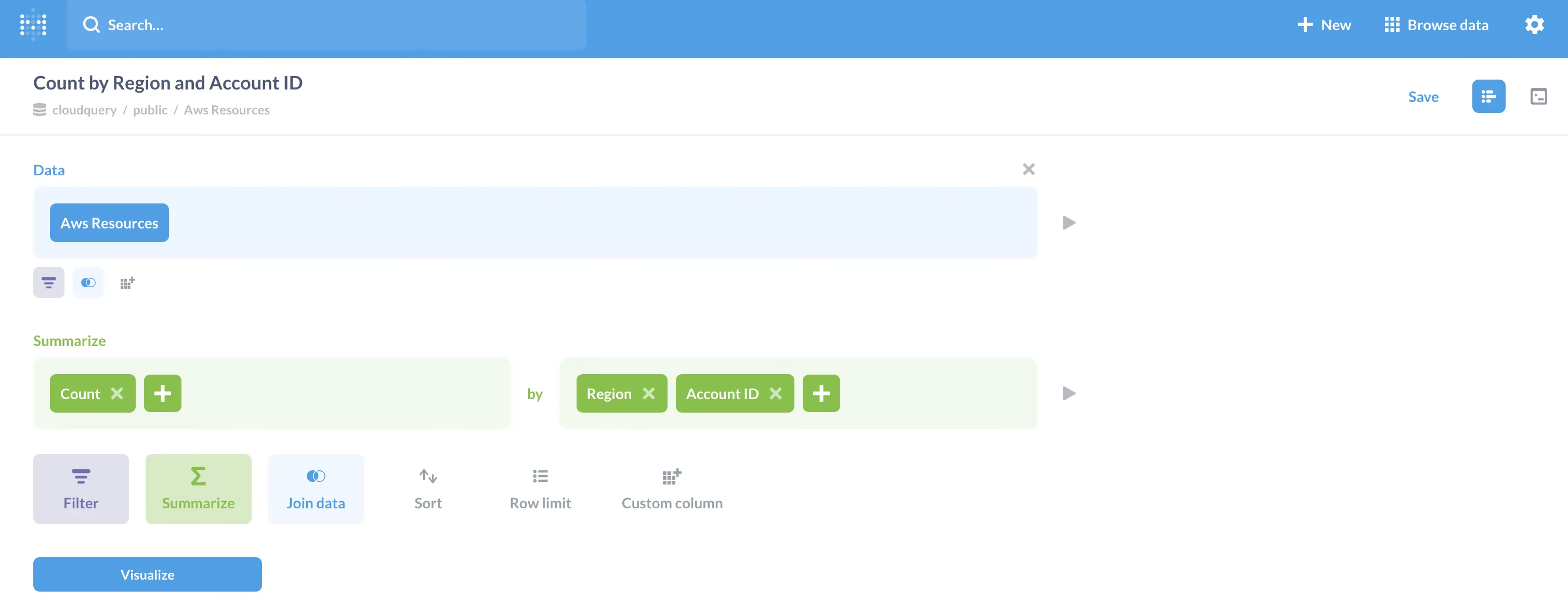
and by clicking visualize you should get the following neat stacked bar:

Step 4: Create Dashboards
Now you can stack multiple visualization into one dashboards (by clicking Save in the previous step) so it will look something like the following:

Step 5: Send Periodic Reports
One of the Coolest features in Metabase is sending periodic reports via email, if you click on the Sharing button on upper right side and then Dashboards subscriptions you will see the following screen:

In our case we will send it to slack on a daily basis!
Summary
In this post we showed you how to build an open-source cloud asset inventory with CloudQuery as the ETL (Extract-Transform-Load) / data-ingestion layer and Apache Superset as the visualization and monitoring platforms. This approach eliminates the yet-another-dashboard fatigue and gives you the ability to pick the best-in-class visualization tools or reuse your current stack.
Want to see CloudQuery in action? Schedule a demo with our team or check out the platform documentation to learn more.
Want help getting started? Join the CloudQuery community to connect with other users and experts, or message our team directly here if you have any questions.
Written by

Try CloudQuery yourself
Self-hosted, open source, and free to start. Or schedule a demo to see the managed version.