I like to measure things. I like to know when what we do actually makes an impact and when we need to improve. At CloudQuery, we used to churn out blog posts and videos, and at one point, I started wondering if they were actually worth the time spent.
Considering we posted on a number of social media, on our Discord server, and we also sent emails, we faced the challenge of bringing all the data together in one place. We had questions about who we were reaching, how our audience was growing, how our posts were performing, and what content really clicked.
Luckily, we knew a company that made a tool just for us: our own! Apart from solving a real problem for ourselves, I was excited about the opportunity of “eating our own dog food” and learning about the challenges some of our customers may face.
Making It Work
First, we mapped out the user journey: what do we want people visiting our website to do? How do they get there? Where are the points where we can measure the number of people getting through?
We reviewed the tools we were using. For website analytics, we used Simple Analytics. We had Typeform for surveys and sign ups, Discord, Twitter, LinkedIn, and YouTube for socials. We also used HubSpot as a CRM. We decided the best way to measure the campaign's performance across the social media was to use Bitly links with UTM tags.
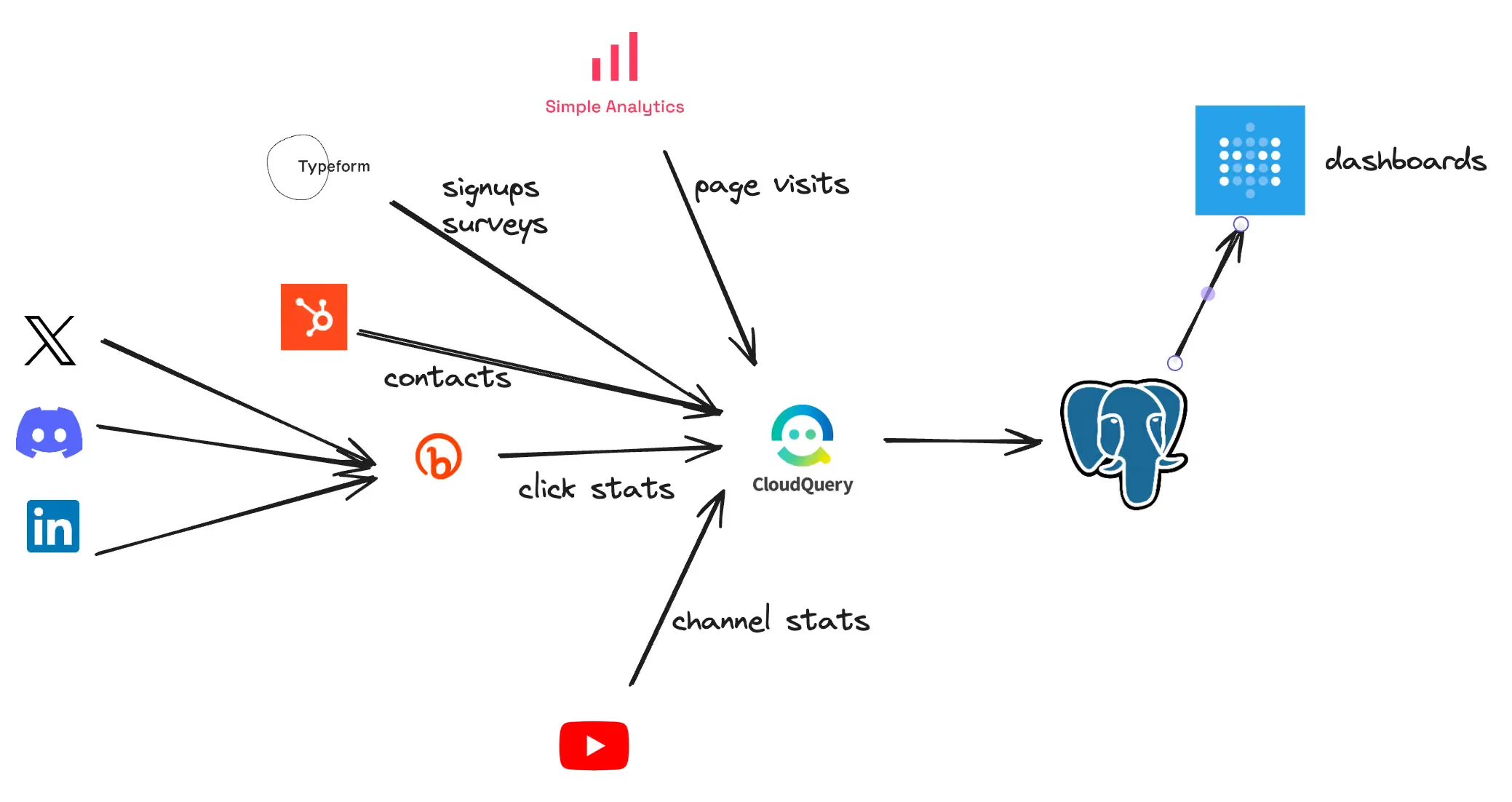
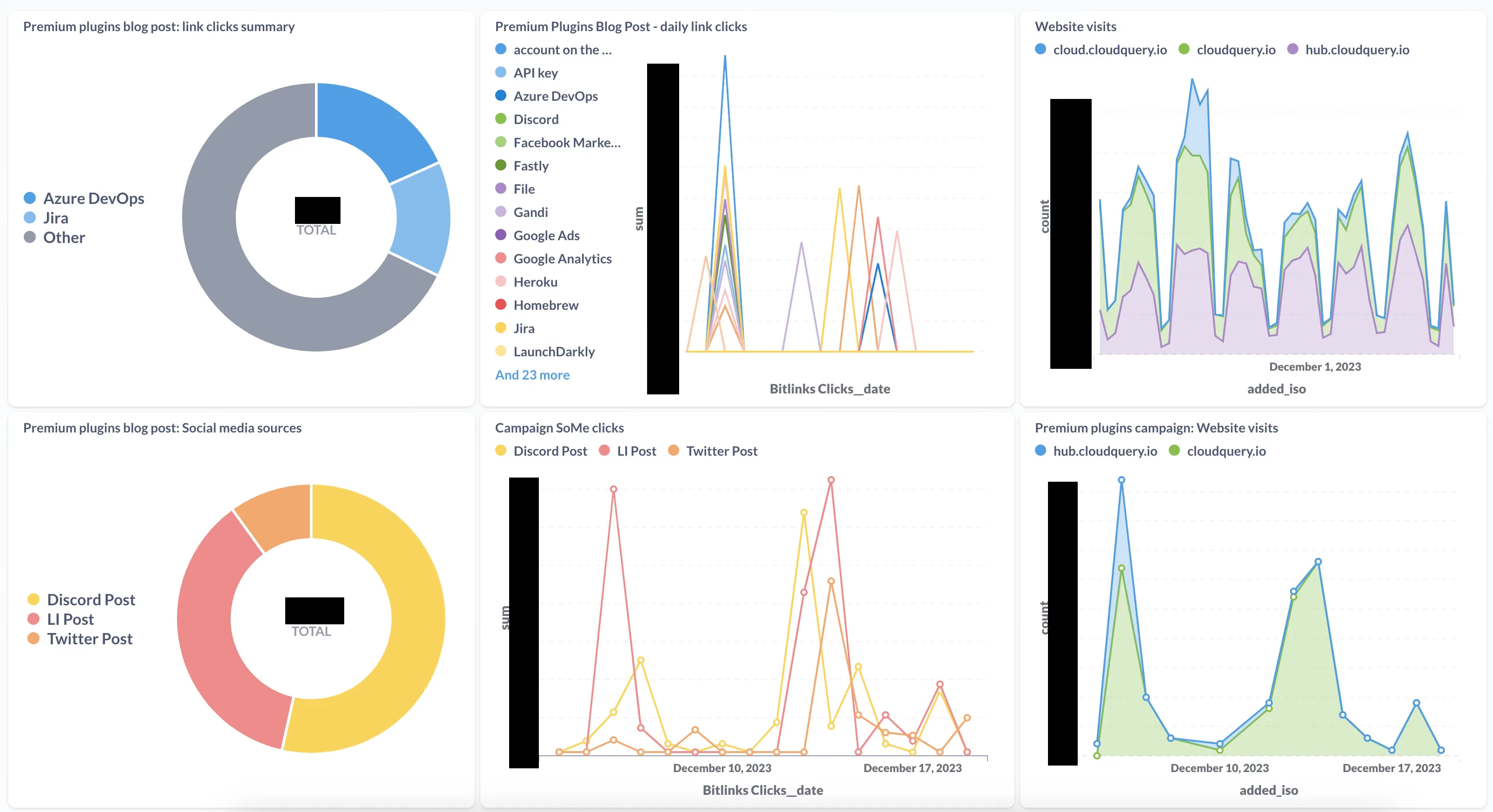
The setup with CloudQuery was pretty straightforward: we now have a few containers running CloudQuery with a cron schedule. Plugins such as Typeform, Bitly, HubSpot, and Simple Analytics are used to sync data from the individual services to a single PostgreSQL database. Another container hosts a Metabase dashboard to help us dig into audience engagement and post performance. We are looking at how our posts to social media are doing from the clicks perspective, how the individual content from emails and blog posts is driving engagement, and how it all translates to website visits and sign ups.
What We Found Out
First, we ran the syncs too often with Bitly and almost ran out of our monthly API quota 😅.
We had to develop a new integration for Bitly using our Python SDK. It was fairly straightforward, although we found out a few things we could improve internally. These will help more developers coming to our platform to develop new integrations.
We learned and also confirmed what we knew about social networks and devised a new strategy for one of them.
What's Next
Looking forward, we are not stopping here. Our plan is to include YouTube in our data mix. While YouTube has its own analytics dashboards, they do not offer as much detail as the actual API does. We also think the power is in combining the data with the other data we already have.
Share your own story
Get inspired by our selection of plugins for Sales and Marketing on our Hub.
Are you interested in learning more? Or have your own story about your data integration journey to share? We’d love to get in touch!
Want to see CloudQuery in action? Schedule a demo with our team or check out the platform documentation to learn more.
Want help getting started? Join the CloudQuery community to connect with other users and experts, or message our team directly here if you have any questions.
Written by

Try CloudQuery yourself
Self-hosted, open source, and free to start. Or schedule a demo to see the managed version.